Summary of the PARA Organizing Method
Classification
Important points
- Do not go beyond 4 levels. (application → stacks → notebooks → notes)
- It should be continuously monitorable.
- Avoid too many categories and too many levels of nesting.
- Separate what can be done from what cannot — organize only what you can do right now so it's easy to see.
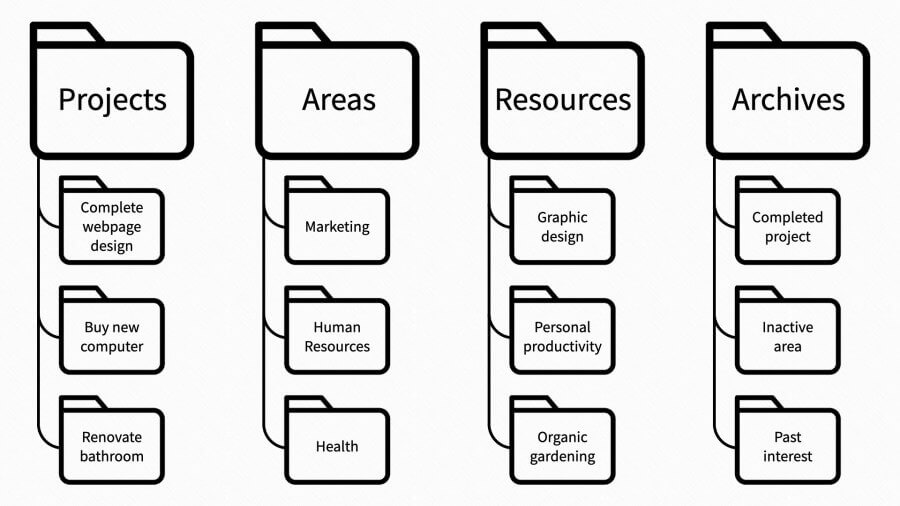
Projects - Project
Projects are tasks with a set deadline, due date, and goal.
E.g., development projects, conference participation, hackathon participation, writing a book.
Areas - Area of Responsibility
Unlike projects, which are time-bound activities, this is an ongoing area of activity with no deadline or due date, and it can contain many sub-projects related to the Area.
E.g., exercise, studying investing, studying development, hobbies, reading.
Resources - Resource
A collection of ongoing topics that you have a continuous interest in. They don't have to be related to a Project or Area.
E.g., SEO, note-writing, online marketing, searching for good restaurants.
Archives - Archives
Topics that don't fit into the three categories above and are currently inactive. Never delete notes in this category.
E.g., finished projects.
Differences
-
Projects <-> Areas
- Projects have goals and deadlines and can be achieved and completed. Areas, on the other hand, have no goals or deadlines and are topics that require ongoing attention.
- Projects are always a subcategory of an Area.
- When something moves from an Area to a Project, it gains progress tracking and a goal, and the effort you've put in so far helps you work toward long-term goals.
- Why separate Projects and Areas instead of one single Area:
- Goals can be broken down into small actionable pieces and achieved.
- It reduces visual clutter.
- You can see all current projects at a glance (and view only the goals separately).
-
Areas <-> Resources
- If it's related to personal matters, it's an Area; if it's a simple collection of interests, it's a Resource.
- Areas and Resources can be interconnected.
-> In a Development Area, wouldn't web typography be a Resource? - What makes up an Area
- As the term Areas of Responsibility suggests, there is Responsibility (as a spouse, as a team leader, as a coach, etc.).
- It is ongoing and requires continuous responsibility and attention from you.
- It requires sustained effort.
- What makes up a Resource
- Your interests
- A clear field/topic
- Materials (photos, typography links, etc.)
Cautions
- A project without a goal is a Hobby.
- A goal without a project is a Dream.
Core Rules for Digital Organization
- Organize by actionability: projects are mostly actionable units, while archives are no longer actionable.
- Organize in spare moments.
- Act quickly and lightly — respond immediately, but avoid things that consume a lot of time.
- Stay flexible to change — avoid formats that only work in a specific notebook and use universal formats whenever possible.
- Complex systems are not built; they grow.
- Let organization expand and grow outward rather than be finished.
- Fail continuously — fix problems?
- Keep the hierarchy shallow.
Flow
PARA is a fluid system, so items can move freely between Projects, Areas, Resources, and Archives at any time.
- From Projects
- To Areas
- When the project needs to be sustained long-term.
- To Resources
- When more learning is needed.
- When doing research for a future Project.
- To Archives
- When the project is finished.
- To Areas
- From Areas
- To Projects
- When you've done enough research and are ready to start a new project.
- To Resources
- When you realize it's simply something related to your interests (no special responsibility required). At this point, you can share the information you've acquired.
- To Projects
- From Resources
- To Projects
- When a simple interest becomes a full-fledged plan.
- To Areas
- When you realize it's not just simple information, but something you need to keep doing with ongoing responsibility.
- To Archives
- When you lose interest (you never delete it).
- To Projects
- From Archives
- To Projects
- When you restart a project.
- To Areas
- When old information has been archived but has been given new responsibility.
- To Resources
- When interest returns (a finished project can become a Resource).
- To Projects
Just-In-Time Organization
- Don't schedule a time for organizing; organize whenever you have spare time.
- Make small, incremental changes rather than large ones. Aim for gradual change instead of one big change.
- Avoid organizing in the following situations:
- If you're in the middle of trying to finish a project.
- Immediately after a project ends (because organizing can lead you straight back into a project).
- Put off time-consuming organizing until the system collapses.
- "System collapse" means a decline in efficiency.
Processing Data
Code - collect, organize, distill, express
Collecting - Collect
The process of collecting information and materials. It can come from anywhere — books or articles. In GTD terms, it's the process of gathering information into an Inbox.
Organizing - Organize
Classify and store the material into the four categories of the PARA method described above.
Distilling - Distill
When the collected information becomes too large, managing the material gets difficult. The material you've gathered so far corresponds to raw material (Raw Material), and now that raw material needs to be distilled into the form we need. During this process, it can also be extracted using the method para's progressive note organization method.
Expressing - Express
The collected and distilled information is processed into your own language. Now you need to express the processed content to the real world. If knowledge and information are not shared with others, a second brain cannot be made. There is a large gap between knowing something and the process of explaining it. By expressing this information, a second brain is created.
Reference
PARA Organizing Method
Classification
Important points
- Do not go beyond 4 levels. (application → stacks → notebooks → notes)
- It should be continuously monitorable.
- Avoid too many categories and too many levels of nesting.
- Separate what can be done from what cannot — organize only what you can do right now so it's easy to see.
Projects - Project
Projects are tasks with a set deadline, due date, and goal.
E.g., development projects, conference participation, hackathon participation, writing a book.
Areas - Area of Responsibility
Unlike projects, which are time-bound activities, this is an ongoing area of activity with no deadline or due date, and it can contain many sub-projects related to the Area.
E.g., exercise, studying investing, studying development, hobbies, reading.
Resources - Resource
A collection of ongoing topics that you have a continuous interest in. They don't have to be related to a Project or Area.
E.g., SEO, note-writing, online marketing, searching for good restaurants.
Archives - Archives
Topics that don't fit into the three categories above and are currently inactive. Never delete notes in this category.
E.g., finished projects.
Differences
-
Projects <-> Areas
- Projects have goals and deadlines and can be achieved and completed. Areas, on the other hand, have no goals or deadlines and are topics that require ongoing attention.
- Projects are always a subcategory of an Area.
- When something moves from an Area to a Project, it gains progress tracking and a goal, and the effort you've put in so far helps you work toward long-term goals.
- Why separate Projects and Areas instead of one single Area:
- Goals can be broken down into small actionable pieces and achieved.
- It reduces visual clutter.
- You can see all current projects at a glance (and view only the goals separately).
-
Areas <-> Resources
- If it's related to personal matters, it's an Area; if it's a simple collection of interests, it's a Resource.
- Areas and Resources can be interconnected.
-> In a Development Area, wouldn't web typography be a Resource? - What makes up an Area
- As the term Areas of Responsibility suggests, there is Responsibility (as a spouse, as a team leader, as a coach, etc.).
- It is ongoing and requires continuous responsibility and attention from you.
- It requires sustained effort.
- What makes up a Resource
- Your interests
- A clear field/topic
- Materials (photos, typography links, etc.)
Cautions
- A project without a goal is a Hobby.
- A goal without a project is a Dream.
Core Rules for Digital Organization
- Organize by actionability: projects are mostly actionable units, while archives are no longer actionable.
- Organize in spare moments.
- Act quickly and lightly — respond immediately, but avoid things that consume a lot of time.
- Stay flexible to change — avoid formats that only work in a specific notebook and use universal formats whenever possible.
- Complex systems are not built; they grow.
- Let organization expand and grow outward rather than be finished.
- Fail continuously — fix problems?
- Keep the hierarchy shallow.
Flow
PARA is a fluid system, so items can move freely between Projects, Areas, Resources, and Archives at any time.
- From Projects
- To Areas
- When the project needs to be sustained long-term.
- To Resources
- When more learning is needed.
- When doing research for a future Project.
- To Archives
- When the project is finished.
- To Areas
- From Areas
- To Projects
- When you've done enough research and are ready to start a new project.
- To Resources
- When you realize it's simply something related to your interests (no special responsibility required). At this point, you can share the information you've acquired.
- To Projects
- From Resources
- To Projects
- When a simple interest becomes a full-fledged plan.
- To Areas
- When you realize it's not just simple information, but something you need to keep doing with ongoing responsibility.
- To Archives
- When you lose interest (you never delete it).
- To Projects
- From Archives
- To Projects
- When you restart a project.
- To Areas
- When old information has been archived but has been given new responsibility.
- To Resources
- When interest returns (a finished project can become a Resource).
- To Projects
Just-In-Time Organization
- Don't schedule a time for organizing; organize whenever you have spare time.
- Make small, incremental changes rather than large ones. Aim for gradual change instead of one big change.
- Avoid organizing in the following situations:
- If you're in the middle of trying to finish a project.
- Immediately after a project ends (because organizing can lead you straight back into a project).
- Put off time-consuming organizing until the system collapses.
- "System collapse" means a decline in efficiency.
Processing Data
Code - collect, organize, distill, express
Collecting - Collect
The process of collecting information and materials. It can come from anywhere — books or articles. In GTD terms, it's the process of gathering information into an Inbox.
Organizing - Organize
Classify and store the material into the four categories of the PARA method described above.
Distilling - Distill
When the collected information becomes too large, managing the material gets difficult. The material you've gathered so far corresponds to raw material (Raw Material), and now that raw material needs to be distilled into the form we need. During this process, it can also be extracted using the method para's progressive note organization method.
Expressing - Express
The collected and distilled information is processed into your own language. Now you need to express the processed content to the real world. If knowledge and information are not shared with others, a second brain cannot be made. There is a large gap between knowing something and the process of explaining it. By expressing this information, a second brain is created.
Reference
Topics: PARA Organization Method
Category: Scrap/Article